
 Back
Creating and Sharing a Journey
A journey starts as a name and an optional persona; you then build its stages and touchpoints on the journey map. This guide covers creating a journey and managing it from the All Journeys page — renaming, copying, sharing and deleting.
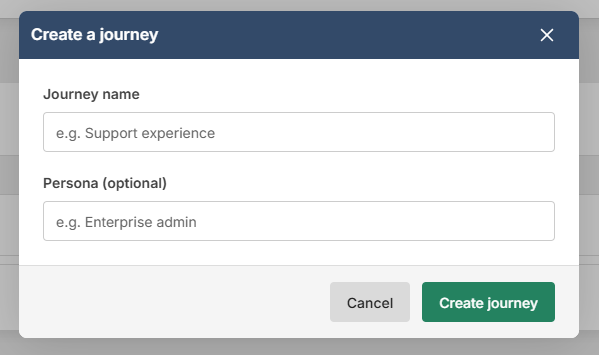
Create a journey
- Click Journeys in the main navigation, then New journey.
- Enter a Journey name, such as "Support experience", and optionally a Persona, such as "Enterprise admin".
- Click Create journey.
The journey opens on the Edit journey map page ready for its first stage. See Building Your Journey Map.
Find and manage journeys
The All Journeys table lists every journey you own or that's shared with you. Click a name to open its overview, search by name, or sort by the Journey, Touchpoints or Last updated headings. The actions menu (three dots) on each row offers:
- Edit journey (owner only) — change the Journey name or Persona (optional) and click Save. Saved immediately; the map is unaffected.
- Permissions (owner only) — share the journey; see below.
- Copy journey — the copy is pre-named "journey name (copy)". Adjust the name and click Yes, Copy Journey. The copy includes name, persona, stages and touchpoints and belongs to you.
- Delete journey (owner only) — click Yes, Delete This Journey to confirm. The journey, its stages, touchpoints and source links are removed permanently; the surveys are not affected.
Share a journey
- Open Permissions from the journey's actions menu.
- Under Select User(s), tick each colleague to share with, then click Apply Changes.
They appear under Users Permitted to edit and the journey appears in their list with a people icon. To stop sharing, click the bin icon beside their name.
Shared users can open the overview, edit the map, copy the journey and link feedback sources — though choosing a survey and its questions for a touchpoint also requires results access to that survey, which is a survey permission rather than a journey one. Without it they can still rename and move the touchpoint. Only the owner can rename the journey, share it or delete it.